Basic Visualization (PyMOL)
This page covers molecular visualization capabilities using PyMOL for creating high-quality graphics and interactive session files.
Visualization Jobs
Create static PyMOL visualizations and interactive PSE session files.
chemsmart run [OPTIONS] mol [MOL_OPTIONS] visualize [SUBCMD_OPTIONS]
Visualization Options
Option |
Type |
Description |
|---|---|---|
|
string |
PyMOL style script (default: zhang_group_pymol_style.py) |
|
string |
Render style (see Visualization Styles) |
|
bool |
Ray trace rendering (default: enabled) |
|
bool |
Add Van der Waals surface (default: disabled) |
|
bool |
Quiet mode (default: disabled) |
|
bool |
Run without GUI (default: enabled) |
|
string |
Coordinates for labeling (1-indexed) |
Basic Usage
Standard visualization:
chemsmart run mol -f molecule.xyz visualize
Quiet mode:
chemsmart run mol -f calculation.log visualize -q
With coordinate labeling:
chemsmart run mol -f structure.xyz visualize -c [[1,2,3]]
Custom style:
chemsmart run mol -f molecule.log visualize -f custom_style.py
Batch visualization from a directory (by file type):
chemsmart run mol -d /path/to/outputs -t log visualize
This creates a single PyMOL session visualizing the last structure of every .log file in the directory.
Batch visualization from a directory (by program):
chemsmart run mol -d /path/to/outputs -p gaussian visualize
This creates a single PyMOL session visualizing the last structure of all Gaussian output files in the directory.
Movie Jobs
Generate rotating movie animations.
chemsmart run [OPTIONS] mol [MOL_OPTIONS] movie [SUBCMD_OPTIONS]
Movie jobs inherit all visualization options.
Basic Usage
chemsmart run mol -f molecule.xyz movie
Hybrid Visualization
Create visualizations with different groups displayed in different styles.
chemsmart run [OPTIONS] mol [MOL_OPTIONS] visualize --hybrid [SUBCMD_OPTIONS]
Hybrid Options
Option |
Type |
Description |
|---|---|---|
|
bool |
Enable hybrid visualization mode |
|
string |
Atom indices for a group (repeatable) |
|
string |
Color for each group (repeatable) |
|
string |
Surface color (default: grey) |
|
string |
Surface transparency (default: 0.7) |
|
string |
Carbon atom color (RGB list) |
|
string |
Nitrogen atom color (RGB list) |
|
string |
Oxygen atom color (RGB list) |
Basic Usage
Basic hybrid visualization:
chemsmart run mol -f molecule.xyz visualize --hybrid -G '1,2,3'
Custom colors:
chemsmart run mol -f molecule.log visualize --hybrid -G '1,2,3' -G '4,5,6' -C cbay -C cbak
Custom background settings:
chemsmart run mol -f structure.xyz visualize --hybrid -G '1,2,3' -ST 0.8 -NC '[0.8, 0.8, 0.9]'
Example
chemsmart run mol -f molecule.xyz visualize --hybrid -G '417-418,422-424' -G '336,397-412'
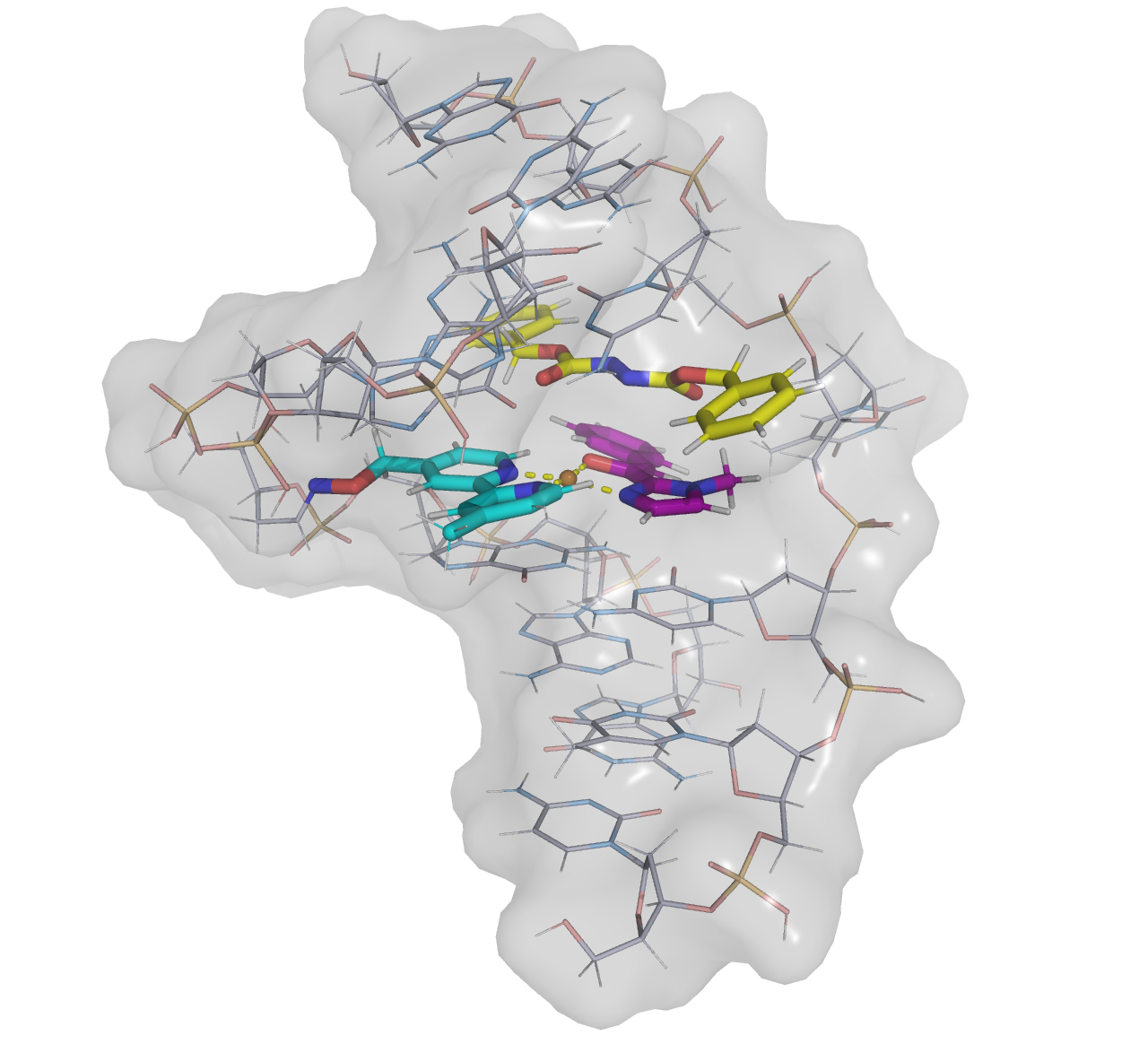
Visualization Styles
Use -s/--style on the visualize subcommand to select a render style. Base styles use
zhang_group_pymol_style.py; scientific styles use zhang_group_scientific_styles.py and are routed through
PyMOLScientificStyleVisualizationJob.
|
Template |
Description |
|---|---|---|
|
|
Default PyMOL ball-and-stick visualization |
|
|
Cylindrical stick representation |
|
|
Glossy semi-metallic rendering with transparent PNG export |
|
|
Comic ball-and-stick rendering with black outlines and element labels |
|
|
Soft pastel ball-and-stick with radius-ratio coordination spheres and illustrated outlines |
|
|
Matte minimal ball-and-stick style for main-text mechanistic figures |
|
|
Soft ceramic / studio ball-and-stick style for coordination complexes |
|
|
Neon coordination-core emphasis using radius-ratio shells and a transparent background |
|
|
Matte clay ball-and-stick using radius-ratio coordination spheres and core hydrogens |
|
|
Monochrome wireframe style for SI structure verification |
|
|
Transparent molecular surface for steric / space-filling views |
|
|
Bold ChemDraw-like style using radius-ratio cores and flat illustrative shading |
Basic Usage
Standard PyMOL style:
chemsmart run mol -f molecule.xyz visualize
chemsmart run mol -f molecule.xyz visualize -s pymol
chemsmart run mol -f molecule.xyz visualize -s cylview
Scientific styles:
chemsmart run mol -f complex.xyz visualize -s glossy
chemsmart run mol -f complex.xyz visualize -s comic
chemsmart run mol -f complex.xyz visualize -s soft-cartoon
chemsmart run mol -f complex.xyz visualize -s editorial-minimal
Highlight metal–ligand bonds with -c. In comic style, each pair is drawn as a ball-and-stick bond; numeric distance
labels are hidden so element labels remain visible. Other scientific styles keep the usual dashed distance measurements.
chemsmart run mol -f complex.xyz visualize -s comic \\
    -c '[[1,2],[1,5],[1,36],[1,3],[1,15],[1,8]]'
Note
-H/--hybrid and derived -s styles are mutually exclusive. Scientific styles resolve the metal center and
coordinating atoms via the radius-ratio select_coordination algorithm. Ray-traced PNG export uses a transparent
background for compositing.
Examples
Glossy

chemsmart run mol -f complex.xyz visualize -s glossy
Comic

chemsmart run mol -f complex.xyz visualize -s comic -c '[[1,2],[1,5],[1,36],[1,3],[1,15],[1,8]]'
Soft cartoon

chemsmart run mol -f complex.xyz visualize -s soft-cartoon
Editorial minimal

chemsmart run mol -f complex.xyz visualize -s editorial-minimal
Soft ceramic

chemsmart run mol -f complex.xyz visualize -s soft-ceramic
Neon coordination core

chemsmart run mol -f complex.xyz visualize -s neon-coordination-core
Matte clay

chemsmart run mol -f complex.xyz visualize -s matte-clay
X-ray wire

chemsmart run mol -f complex.xyz visualize -s xray-wire
Steric surface

chemsmart run mol -f complex.xyz visualize -s steric-surface
Quasi-ChemDraw bold

chemsmart run mol -f complex.xyz visualize -s quasi-chemdraw-bold
Align Jobs
Align multiple molecular structures for comparison (Alignment reference is the first structure).
chemsmart run [OPTIONS] mol align [SUBCMD_OPTIONS]
Basic Usage
Align multiple files:
chemsmart run mol -f mol1.xyz -f mol2.gjf -f mol3.log -i 1 align
Align all files of the same type:
chemsmart run mol -d . -t xyz -l xyz_alignment align
Note
When using -i n, ensure every input file contains the nth structure. Here -t/--filetype is extension-based:
it filters filenames such as .xyz or .log and does not infer a Gaussian or ORCA program identity.
Align multiple structures in one file:
chemsmart run mol -f conformers.xyz -i 1,3-6,-1 align
Note
If there is no additional index, align all structures in the file by default.