NCIPLOT Tutorial
This section will cover NCIPLOT analysis capabilities in CHEMSMART.
Note
For NCI visualization using PyMOL, see Interaction Analysis (PyMOL).
Overview
NCIPLOT is a tool for analyzing non-covalent interactions in molecular systems by generating density and reduced density
gradient (RDG) cube files. CHEMSMART provides a convenient interface for running NCIPLOT calculations through the
chemsmart sub nciplot command.
Input File Types and Density Calculations
NCIPLOT supports different types of input files, and the density calculation method depends on the file format:
Promolecular Density
When using structure files without wavefunction data (e.g., .xyz, .log, or other geometry files), NCIPLOT
calculates the density using promolecular approximation. This method is faster but less accurate than using SCF
wavefunction data.
Supported file formats for promolecular density:
.xyz- Cartesian coordinates.log- Gaussian output files (coordinates only)Any other geometry file format supported by CHEMSMART’s file converter
Behavior: When you provide these file types, CHEMSMART automatically:
Appends
_promolecularto the job label (unless already present)Converts non-XYZ files to XYZ format with
_promolecular.xyzsuffixGenerates output files with the promolecular label
Wavefunction Density
When using wavefunction files (e.g., .wfn or .wfx), NCIPLOT uses the SCF wavefunction density for more
accurate calculations.
Supported file formats for wavefunction density:
.wfn- Gaussian wavefunction file.wfx- Extended wavefunction format
Behavior: When you provide these file types, CHEMSMART:
Uses the original file label without modification
Directly uses the wavefunction data for density calculations
Generates output files without the promolecular suffix
Warning
After the required files have been generated with NCIPLOT, they can be loaded using CHEMSMART’s built-in PyMOL visualization commands. However, the same molecular structure may yield different NCI plots depending on whether NCIPLOT uses promolecular density or wavefunction density.
Workflow (Gaussian → NCIPLOT → PyMOL)
                            test.log file or test.xyz file
                                          |
                                          |
                      +-------------------+-------------------+
                      |                                       |
                      |                     chemsmart sub gaussian -f test.log nci
                      |                                       |
                      |                                       v
                      v                             generate test_nci.wfn
+-----------------------------------------+---------------------------------------+
| Promolecular (use .log / .xyz)          | Wavefunction (from .wfn/ .wfx)        |
+-----------------------------------------+---------------------------------------+
|                 test.log                |             test_nci.wfn              |
|               (or test.xyz)             |          (or test_nci.wfx)            |
|                     |                   |                  |                    |
|                     v                   |                  v                    |
|    chemsmart sub nciplot -f test.log    | chemsmart sub nciplot -f test_nci.wfn |
|                     |                   |                  |                    |
|                     v                   |                  v                    |
|      test_promolecular-dens.cube        |          test_nci-dens.cube           |
|      test_promolecular-grad.cube        |          test_nci-grad.cube           |
+-----------------------------------------+---------------------------------------+
                                          |
                                          v
                            chemsmart run mol -f ... nci
                                          |
                                          v
            nci_promolecular_density.pse  /  nci_wavefunction_density.pse
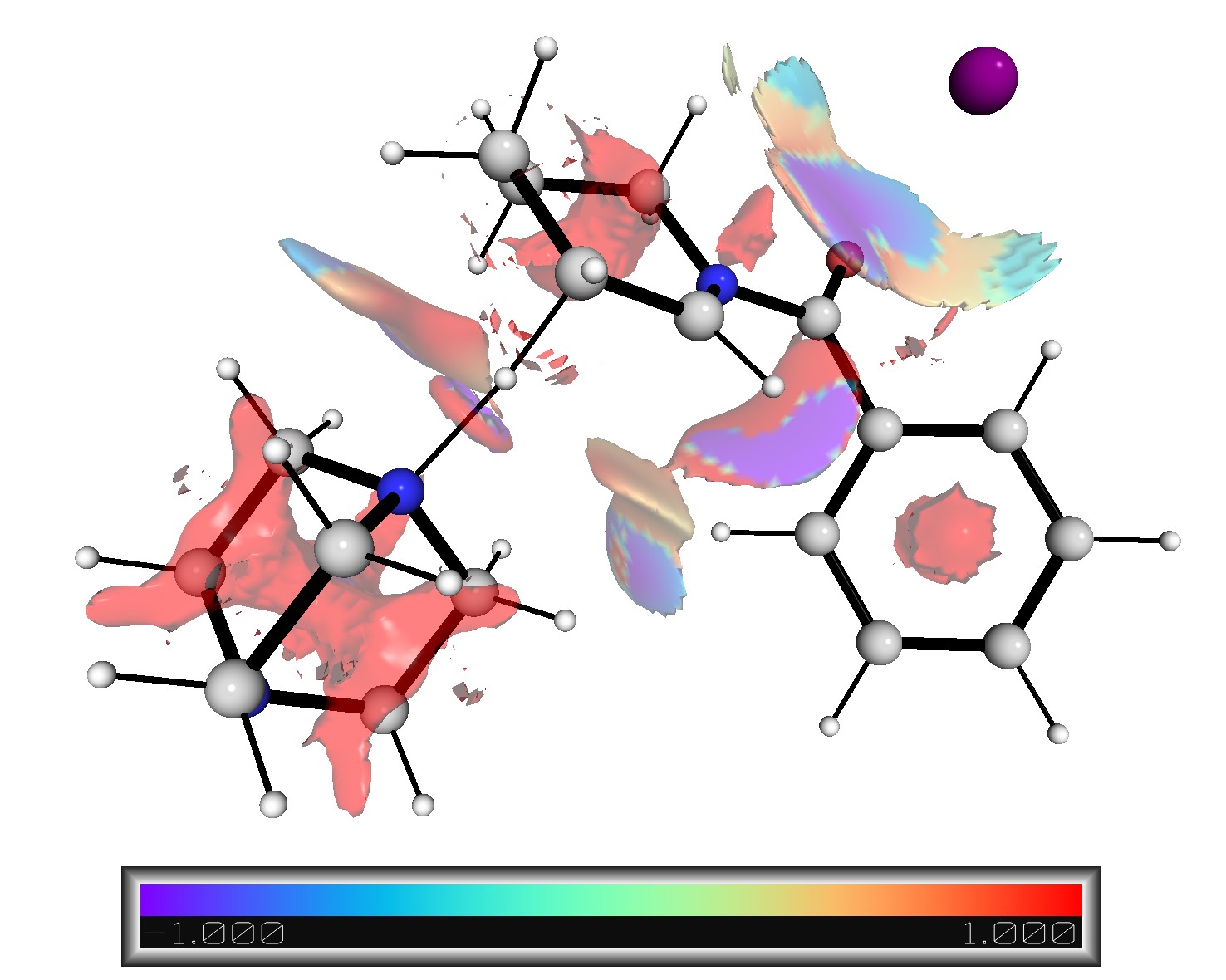
Promolecular Density
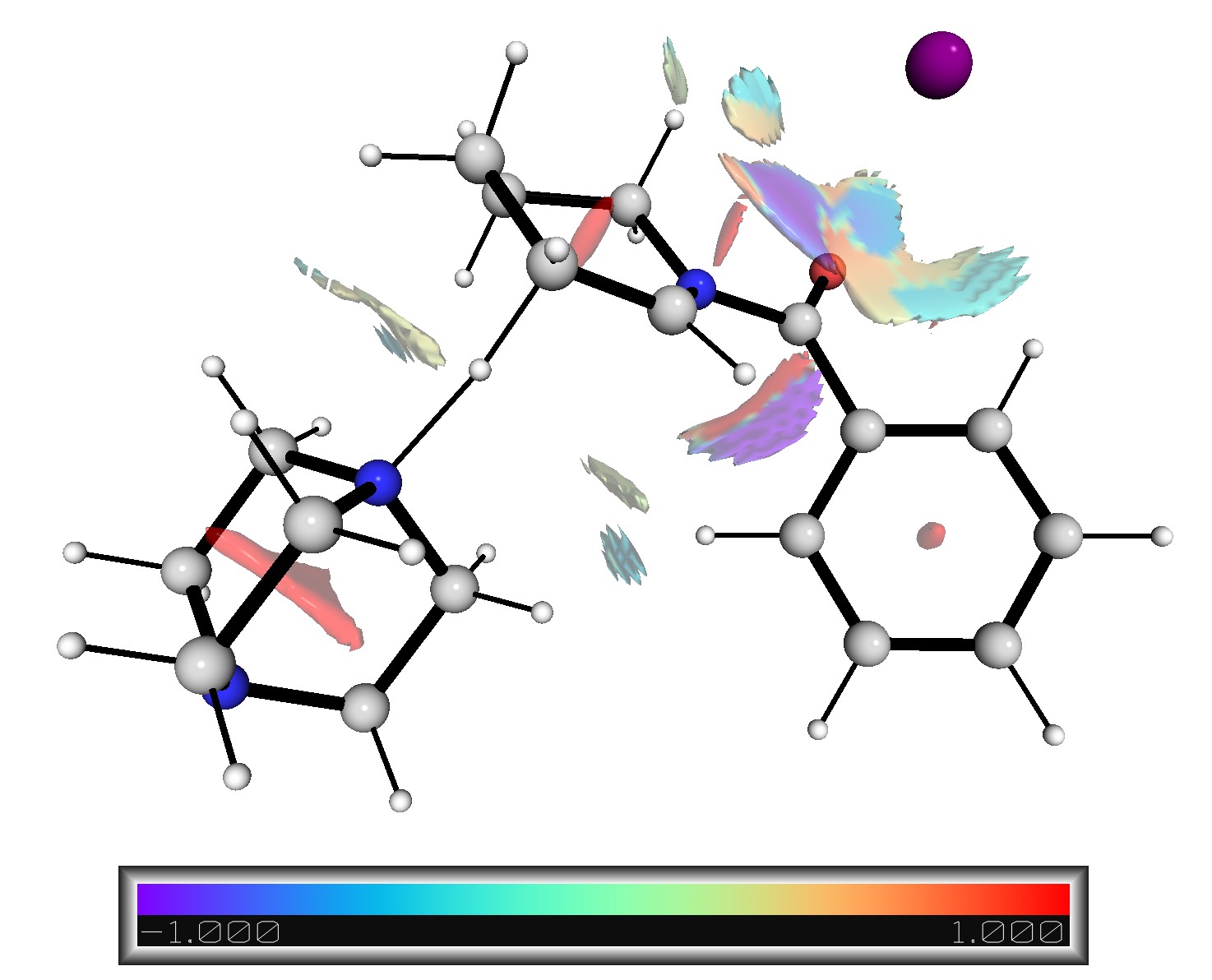
Wavefunction Density
Usage Examples
Example 1: Using XYZ File (Promolecular Density)
chemsmart sub -s xz nciplot -f azetidine_nci.xyz
What happens:
Input file:
azetidine_nci.xyzJob label:
azetidine_nci_promolecularInput file for NCIPLOT:
azetidine_nci_promolecular.nciOutput files:
azetidine_nci_promolecular.ncioutazetidine_nci_promolecular-dens.cubeazetidine_nci_promolecular-grad.cube
Example 2: Using Gaussian Log File (Promolecular Density)
chemsmart sub -s xz nciplot -f azetidine_nci.log
What happens:
Input file:
azetidine_nci.logFile converted to:
azetidine_nci_promolecular.xyzJob label:
azetidine_nci_promolecularInput file for NCIPLOT:
azetidine_nci_promolecular.nciOutput files:
azetidine_nci_promolecular.ncioutazetidine_nci_promolecular-dens.cubeazetidine_nci_promolecular-grad.cube
Example 3: Using Wavefunction File (SCF Wavefunction Density)
chemsmart sub -s xz nciplot -f azetidine_nci.wfn
What happens:
Input file:
azetidine_nci.wfnJob label:
azetidine_nci(no promolecular suffix)Input file for NCIPLOT:
azetidine_nci.nciOutput files:
azetidine_nci.ncioutazetidine_nci-dens.cubeazetidine_nci-grad.cube
Important Note: Even if azetidine_nci.wfn exists in the same directory, using -f azetidine_nci.xyz or -f
azetidine_nci.log will still run the job using promolecular density. You must explicitly specify the .wfn file to
use wavefunction density.
Custom Job Labels
You can override the automatic labeling behavior using the -l or --label option:
# Custom label for XYZ file
chemsmart sub -s xz nciplot -f azetidine_nci.xyz -l my_custom_label
Result: Job will be labeled my_custom_label_promolecular (promolecular suffix is still added for
non-wavefunction files)
# Custom label for WFN file
chemsmart sub -s xz nciplot -f azetidine_nci.wfn -l my_custom_label
Result: Job will be labeled my_custom_label (no promolecular suffix for wavefunction files)
Multiple Input Files
NCIPLOT can analyze multiple molecules simultaneously:
chemsmart sub -s xz nciplot -f molecule1.xyz -f molecule2.xyz
Result: Job label will be molecule1_and_molecule2
Additional NCIPLOT Options
CHEMSMART provides many options for customizing NCIPLOT calculations. For a complete list, use:
chemsmart sub nciplot --help
Common options include:
-r, --rthres: Distance threshold for grid extension--ligand-file-number: Specify ligand file for interaction analysis--ligand-radius: Radius of interaction from ligand-i1, --intercut1: Cutoff 1 for intermolecularity-i2, --intercut2: Cutoff 2 for intermolecularity--fragments: Define molecular fragments--dgrid: Use radial grids for promolecular densities--integrate: Trigger integration of properties--grid-quality: Set grid quality (coarse/fine/ultrafine)
For more details on these options, refer to the original NCIPLOT program documentation and the command help.